

Crypto.com is a CSA-registered Restricted Dealer in Canada, run through Foris DAX CAN ULC, an Alberta company that is also a FINTRAC-registered money services business. Its Canadian page promotes instant zero-fee CAD deposits by Interac e-Transfer and Apple or Google Pay, 400+ supported cryptocurrencies, on-chain staking, a prepaid Visa card and maker and taker fees "as low as 0.08% and 0.18%". It is not part of my top 10 because the Canadian fee schedule is hard to pin down, the app spread is not shown up front and account-level support can be slow.

- Best ForA broad app with a crypto card
- Trading FeeNot published for Canada
- CAD FundingNot verified
- Coins400+ on its exchange (global list)
- App Store (Canada)4.6 / 5 from 66,198 ratings
- Google Play4.4 / 5 from 692K reviews
| Detail | Info |
|---|---|
| Legal Entity | Foris DAX CAN ULC, an Alberta unlimited liability corporation, operating as Crypto.com and Crypto.com Canada |
| CSA Status | CSA-registered Restricted Dealer with the Ontario Securities Commission and the CSA. CSA decision dated May 8, 2025. Not a CIRO member |
| FINTRAC | Foris DAX CAN ULC (C100000094): registered, expiry June 30, 2027. Related Foris entities also registered |
| Coins | 400+ supported cryptocurrencies per Crypto.com's Canadian page. The global Exchange venue lists 417 spot base assets, and the Canadian app list is narrower |
| CAD Funding | Instant, zero-fee deposits via Interac e-Transfer and Apple or Google Pay, per its Canadian page. Other fees and spread may apply. Per-method limits are not published |
| Trading Fees | Not published in a single Canadian schedule. Marketing says maker and taker fees as low as 0.08% and 0.18%. The global Exchange venue shows 0.25% maker and 0.50% taker at Level 1 |
| Staking | On-chain staking is offered. Check the app for assets and rates in your province |
| Card | Crypto.com Prepaid Visa Card. Its Level Up program offers up to 5% in CRO rewards on eligible purchases |
| Welcome Bonus | Canada keeps the legacy Welcome Bonus, enrolled after KYC and milestone-based. I could not verify the amount on the official page |
| App Ratings | Apple Canada 4.63 (66,198 ratings), Google Play 4.4 (692K reviews, global) |
Pros
- Registered in Canada as a Restricted Dealer
- Broad coin list and a crypto card in one account
- Free Interac e-Transfer deposits per its Canadian page
- On-chain staking
- Proof of Reserves page
Cons
- No single published Canadian fee schedule
- The app price includes a spread you only see when you compare
- Card and fee perks lean on its own token, CRO
- Account freezes and slow escalation come up often in user reviews
- No phone support
How Can You Check That Crypto.com Is Registered?
Do not take my word for it. These are the official registers, with what they showed for Crypto.com when I checked them for this review.
| Register | Result | Verify |
|---|---|---|
| CSA list of authorized crypto platforms | Listed: Foris DAX CAN ULC (Crypto.com), Crypto Asset Trading Platform. | Check the CSA list |
| CIRO dealer member | No | Check CIRO’s list |
| FINTRAC money services business | Registered, M21385577 | Search FINTRAC’s registry |
Is Crypto.com Legal, Legit And Safe For Canadians?

Yes. Crypto.com serves Canadians through Foris DAX CAN ULC, which describes itself as registered with FINTRAC as a money services business and with the OSC and CSA as a Restricted Dealer. The CSA's authorized list shows a decision dated May 8, 2025. Restricted Dealer status puts it in the same regulatory category as Coinbase and Kraken.
I have been using Crypto.com since 2021. The 2022 hack is worth putting in context: Crypto.com found a vulnerability in its 2FA system, reimbursed the affected users, and patched it. The company also publishes a Proof of Reserves page you can check yourself. Marketing claims you may see elsewhere, such as insurance totals and certifications, I could not confirm from the Canadian pages, so I do not quote them. Practical protections I recommend: use an authenticator app or passkey, set the anti-phishing code that appears in every genuine email, and use withdrawal address whitelisting.
What Security Controls Should You Turn On?
Crypto.com supports multi-factor authentication, and I would use an authenticator app, a passkey or a hardware security key instead of SMS. Set the anti-phishing code, a custom phrase that then appears in every genuine email, so a fake message stands out. Use withdrawal address whitelisting, which adds a delay before a new address can receive funds and gives you time to react if someone else gets into your account. Keep your phone and email secure, because account recovery runs through them. And check the sign-in alerts you receive: an alert you did not trigger means act at once.
What Is Crypto.com's Track Record And What Changed Since 2022?
Crypto.com was founded in 2016 in Hong Kong under the name Monaco, rebranded as Crypto.com in 2018 and grew into one of the biggest consumer crypto apps in the world. For Canadians, the key developments are regulatory. It signed a pre-registration undertaking with the OSC in 2022, which let it keep serving Canadians while it worked toward registration, and it received its Restricted Dealer decision from the CSA on May 8, 2025. Its current Canadian page lists on-chain staking, a prepaid Visa card tied to a Level Up program and an orderbook service alongside the main app.
| Period | Milestone |
|---|---|
| 2016 | Founded in Hong Kong as Monaco |
| 2018 | Rebranded as Crypto.com |
| January 2022 | Security incident through a 2FA weakness. Affected users were reimbursed |
| 2022 | Pre-registration undertaking with the OSC for Canadian service |
| May 8, 2025 | CSA decision for Foris DAX CAN ULC as a Restricted Dealer |
| 2026 | Canadian page promotes zero-fee Interac deposits, on-chain staking and the Level Up program. FINTRAC registration runs to June 30, 2027 |
What Can Canadians Not Do On Crypto.com?
Rules for Canadians are tighter than on the global site, and they change. Some products offered elsewhere are limited, restricted by province or not offered at all in Canada. My earlier article said futures, margin trading and USDT were unavailable to Canadian clients and that certain earn products were restricted. I could not re-verify each of those on the current Canadian page, so use this table as a checklist for what to confirm in your own app.
| Feature | What I Could Verify |
|---|---|
| Spot trading | Yes. The Canadian page lists 400+ supported cryptocurrencies |
| Interac e-Transfer deposits | Yes. Listed as instant and zero-fee on the Canadian page |
| On-chain staking | Yes. Listed on the Canadian page. Check assets and provinces in the app |
| Prepaid Visa card | Yes. Listed on the Canadian page, with the Level Up program |
| Futures and margin | Not listed for Canadian retail on the Canadian page. Confirm before assuming you can use them |
| USDT | My earlier article said it was removed for Canadians. I could not re-verify, so check in the app |
| Earn products | Some are listed, and some may be restricted for Canadians. Check in the app |
| OTC desk | Listed. For large trades, with minimums set by Crypto.com |
| Trading bots | DCA, Grid and TWAP bots are listed on the Canadian page |
Should Canadians Use The Crypto.com App Or The Exchange?
Crypto.com's Canadian service is described as a main app and an orderbook service offered by the same Canadian entity. The simple app is where most Canadians start: it shows a price and completes a trade in two taps. That price includes Crypto.com's margin, and there is no separate fee line. The orderbook view is a professional interface with a live order book, charts, limit orders and maker and taker fees, which Crypto.com says go as low as 0.08% and 0.18%. For regular buying, the orderbook is usually cheaper per trade than the app's built-in spread, the same pattern as Coinbase's Simple Trade versus Advanced Trade. Switching between them uses the same account. If you will make more than one purchase, learn the orderbook, which takes about 15 minutes.
How Do You Sign Up And Verify On Crypto.com Canada?
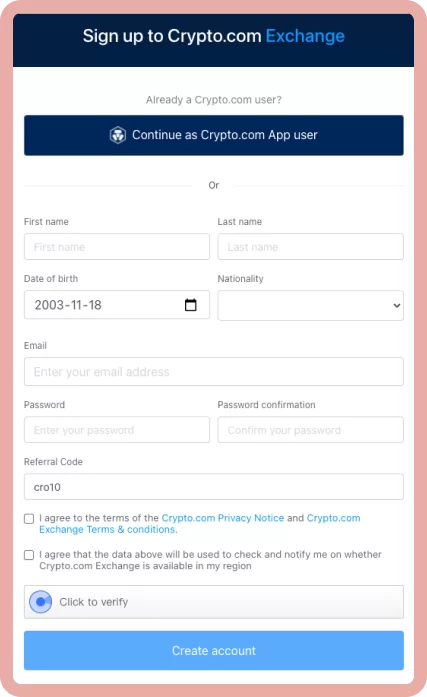
Sign-up asks for an email, phone number, government-issued photo ID and a selfie. Verification is usually quick through automated ID review, though a manual review can take longer. As a CSA-registered dealer, Crypto.com also asks Canadian clients an investor questionnaire about crypto experience, risk tolerance and intended use. Depending on your answers, initial trading limits may apply. Those are Canadian regulatory requirements, not optional extras. Two-factor authentication is set up during onboarding.
What you need on hand: an email address and password, a phone number that can receive a verification code, a driver's licence or passport, a camera for the selfie, to be at least the age of majority in your province, and Canadian residency. Crypto.com's check is more streamlined than platforms like NDAX, which asks about employment and source of funds at sign-up, because automated ID review clears most retail accounts in minutes. If you get a manual review notice, expect it to take longer, up to a couple of days at busy times. Answer the investor questionnaire honestly, since your answers can set your initial limits, and keep a screenshot of anything you submit.
How Do Canadians Add Funds To Crypto.com?

The best route for Canadians is Interac e-Transfer, which Crypto.com's Canadian page describes as instant and zero-fee, with Apple and Google Pay also listed. In my personal testing, Interac deposits have consistently arrived within 30 to 60 minutes. Bank transfer and debit or credit card are also listed, and cards usually carry extra fees, so use Interac when you can. Crypto deposits from another wallet are supported. Always match the network to the asset, because sending to the wrong network can lose funds.
Interac, Bank Transfer, Card And Crypto Deposits
Interac e-Transfer is the one I use and recommend: it is described as instant and zero-fee, and it is available whenever your bank lets you send e-Transfers. In the app, open your fiat wallet, choose to add cash, select Interac e-Transfer and follow the prompts. Unlike some Canadian exchanges that connect directly to your bank, deposits run through a payment processor, which can occasionally mean a longer wait than the headline says, so allow time before you panic. Bank transfer (EFT) is listed too and is better for larger deposits where speed does not matter, though it takes longer to clear. Debit and credit cards are the instant option and usually carry a fee that varies by card and issuer, so they are not the cost-efficient choice for larger purchases. Crypto deposits from another wallet are free to receive. Choose the network that matches the asset and the sending wallet, because a deposit sent on the wrong network can be lost or need a support ticket to recover. Withdrawal limits and times depend on your verification level, so check them in the app before you need the money.
How Do You Buy Your First Crypto On Crypto.com?
- Fund your account. Add cash by Interac e-Transfer and wait for the balance to show in your fiat wallet.
- Choose the coin. Open the buy screen, search for the coin and check that it is available to you in your province.
- Look at the price before you confirm. Compare the quote to a market price on another site, so you know what the spread costs you.
- Start small. Make one small purchase first to see the full cost and the confirmation screen.
- Move it if you want to hold it yourself. Withdraw to a wallet you control, using the network that matches the wallet, after a small test transfer.
- Record it. Save the transaction for your tax records.
How Do You Withdraw From Crypto.com To A Canadian Bank Account?
For crypto, open the withdrawal screen, choose the coin and the network, paste the destination address and confirm with your two-factor code. If you use address whitelisting, a new address may face a delay before it is usable, which is the feature working as intended. Withdrawal fees are fixed per asset and network and are shown before you confirm, so compare networks when more than one is offered. For CAD, I could not retrieve a published list of Canadian withdrawal methods, so check the app. If a CAD route is not available to you, the standard workaround is to move crypto to a Canadian exchange such as NDAX or Kraken, sell it there and withdraw by Interac. Make a small test withdrawal before you rely on any route, and do it before you need the money, not on the day.
Crypto.com Fees In Canada: What Do You Really Pay?

This is the hardest part to pin down, and I say so plainly. Crypto.com does not publish one Canadian fee table I could retrieve. What the Canadian page says is that deposits are zero-fee ("other fees and spread may apply"), that maker and taker fees run as low as 0.08% and 0.18%, and that a Level Up subscription can bring zero trading fees up to a limit that depends on your tier. The global Exchange venue shows 0.25% maker and 0.50% taker at its first level, but that is not the Canadian service. Crypto withdrawal fees are set per asset and per network and change with network conditions, so read the in-app fee before you confirm. Before trading size, make one small trade and compare what you paid to the market price.
| Cost | Where To Find It |
|---|---|
| Spread On App Trades | Compare the app's buy price to a market rate before confirming |
| Maker And Taker Fees | The orderbook view in your Canadian account, by your tier |
| Card Deposit Fee | Shown at checkout before you pay |
| Withdrawal Fee | Shown in the app per asset and network |
| Level Up Subscription | Crypto.com's Level Up table, including the trade limit for zero fees |
How Does Crypto.com Make Money?
Crypto.com earns from the spread built into app trades, maker and taker fees on the orderbook, withdrawal fees, card interchange, its CRO token ecosystem and institutional services such as its OTC desk. For a casual Canadian user who buys in the app and never looks at the orderbook, the spread is the main revenue source. That is not unique to Crypto.com. Coinbase does the same with Simple Trade versus Advanced Trade. But it is worth knowing, because a user who trades regularly in the app can pay many times more per trade than one on the orderbook. The moment you start making regular purchases, learn the orderbook. The learning curve is about 15 minutes and the saving is immediate.
What Features Does Crypto.com Offer Canadians?

400+ Coins
Crypto.com's Canadian page says you can buy from over 400 supported cryptocurrencies. For comparison, my verified figures put NDAX at 77 assets, Coinbase at 200+ and Kraken at about 490. Some coins are restricted by province, so verify in the app.
On-Chain Staking
On-chain staking is listed on Crypto.com's Canadian page as a way to earn rewards for securing a blockchain. Advertised yields vary by asset and change with network conditions, and provincial restrictions may apply, so check current availability in the app. Read my guide to crypto staking and taxes in Canada first.
Staking means locking coins to help secure a proof-of-stake network in return for rewards. Check three things before you stake: whether the coins are locked and for how long, whether the reward is paid in the same coin, and what happens to your principal if the platform has a problem. Staking on a registered Canadian platform keeps you inside Canadian rules, while rewards are generally taxable income when you receive them.
Prepaid Visa Card And Level Up
The Crypto.com Prepaid Visa Card is a prepaid card, not a credit card. Its Level Up program promises up to 5% in CRO rewards on eligible purchases, and higher tiers require staking CRO. Tier names, stake sizes and perks have been reshuffled more than once, so I no longer publish a tier table that could go stale. Check Crypto.com's own Level Up table and compare it with my crypto Visa cards in Canada comparison. The real cost of the better tiers is the CRO you must hold: if CRO drops while your stake is locked, rewards on card spending rarely make up for it.
Proof Of Reserves
Crypto.com publishes a Proof of Reserves page. It describes an independent third-party verification report by an international audit, tax and advisory firm, which used cryptographic procedures to confirm the availability and backing of customer balances, and it uses Merkle trees so you can check that your own balance was included. That is more transparency than many exchanges give, though a reserves check does not tell you about a company's debts, and I would still treat it as one input, not as a guarantee.
Trading Bots And The Orderbook
Crypto.com lists automated trading bots, specifically Dollar Cost Averaging, Grid and Time-Weighted Average Price bots, that run your trades on rules you set. A DCA bot buys a fixed amount at regular intervals, which suits long-term holders. A grid bot places buy and sell orders at set price steps and tends to do well in sideways markets and badly in a strong trend. A TWAP bot splits a large order over time to reduce its impact on the price. Bots automate decisions and do not remove risk, so test with a small amount first. The orderbook view also offers professional charts through TradingView, limit orders and advanced order types.
OTC Desk, NFT Marketplace And Earn Programs
Crypto.com lists an OTC desk for large trades, an NFT marketplace, a Supercharger program for depositing CRO to earn rewards and other earn products. Availability of each differs by province and changes with regulation, and I have not tested all of them in Canada, so confirm in your own app. Treat any advertised reward rate as a marketing figure that can change, and remember that earn products carry platform risk on top of the risk of the coin.
How Does Crypto.com Compare To Other Exchanges Available To Canadians?
| Exchange | Score | Fees | Canadian Status |
|---|---|---|---|
| Crypto.com | Unranked | Not published in one Canadian table | CSA-registered Restricted Dealer |
| Coinbase | 9.8 | Up to 1.875% on simple buys, plus spread | CSA-registered |
| Kraken | 9.2 | Pro 0.40% maker / 0.80% taker, Instant Buy 1% | CSA-registered |
| Wealthsimple Crypto | 8.4 | 0.5% plus spread | CSA-registered, CIRO investment dealer |
| Newton | 7.9 | No fee, spread from 1.00% on BTC | CSA-registered, CIRO investment dealer |
| NDAX | 7.8 | Flat 0.20% | CSA-registered, CIRO investment dealer |
How I read that table: Coinbase, Kraken and Wealthsimple Crypto publish clearer pricing and rank higher for that reason. NDAX is the simplest to price at a flat 0.20%. Crypto.com's strengths are the wide coin list, staking and the card, and its weakness is that the cost of a trade is harder to see before you press the button. If cost and clarity matter most, start with one of those platforms and keep Crypto.com for the features you cannot get elsewhere.
Head-to-head pages: Coinbase vs Crypto.com, NDAX vs Crypto.com, Newton vs Crypto.com, Shakepay vs Crypto.com and Wealthsimple Crypto vs Crypto.com.
What Are The Biggest Complaints About Crypto.com For Canadians?

User reviews on Trustpilot are low while app store ratings are high, which tells a story. The dominant complaints are account freezes and withdrawal delays, slow support during busy markets, app spreads that catch people off guard, and frustration with the CRO staking requirements for card benefits. The high app store ratings suggest the day-to-day trading experience is fine for users who do not hit a compliance or account-level issue.
Account Freezes And Withdrawal Delays
This is the most serious and consistent pattern. Users report accounts frozen for a day or more during identity re-verification, large withdrawals or unusual activity. Crypto.com's compliance systems are thorough, which is partly why the security record is strong, but the same systems generate friction for legitimate users. When everyone tries to withdraw at once, support queues stretch. Escalation to a human can take days. This is the most important risk for Canadians using Crypto.com to understand.
App Spreads Are Not Prominently Disclosed

The app quotes a price and completes the trade, and the spread is embedded in that price. Many users only realize what they paid when they compare their buy price to the market rate afterward. The practical fix is to use the orderbook view for anything beyond a first purchase.
Withdrawal Fees On Some Networks
Withdrawing stablecoins on the Ethereum mainnet can cost a fixed amount per withdrawal that is large relative to a small balance. This is not unique to Crypto.com, but it is high compared with platforms like Shakepay that cover network fees. Use a cheaper network where supported, and check the in-app fee before you confirm each withdrawal.
CRO Volatility Risk
The meaningful card rewards and fee reductions require staking CRO, which is volatile. If you lock a stake and CRO falls sharply during the lock, the rewards on typical card spending rarely offset the loss. Weigh the stake against the current CRO price and your conviction in the token before committing.
Scam Awareness
A large user base makes Crypto.com a prime impersonation target. The anti-phishing code, a phrase you set that appears in every genuine Crypto.com email, is its best defence against phishing. Set it up straight after creating your account. Never share 2FA codes, passwords or private keys with anyone claiming to be support. See my guide to common crypto scams in Canada.
What Should You Know About CRO Staking Before You Lock Anything?
The better card rewards and fee reductions at Crypto.com have long depended on holding and staking CRO, the platform's own token, and on locking it for a fixed period. Before you do that, ask four questions. What exactly do I get at this tier, and is it still offered? How long is the lock, and what is the cooldown before I can sell? What happens to my rewards if CRO falls sharply while it is locked? And would I be happy to hold this much CRO even without the card? A stake that makes sense only if the token holds its price is a bet on CRO, not a saving on card spending. The Level Up program has replaced earlier tier names, so read the current table on the official page before you decide, and start with the smallest tier that gives you something you will actually use.
How Is Crypto.com's Customer Support For Canadians?
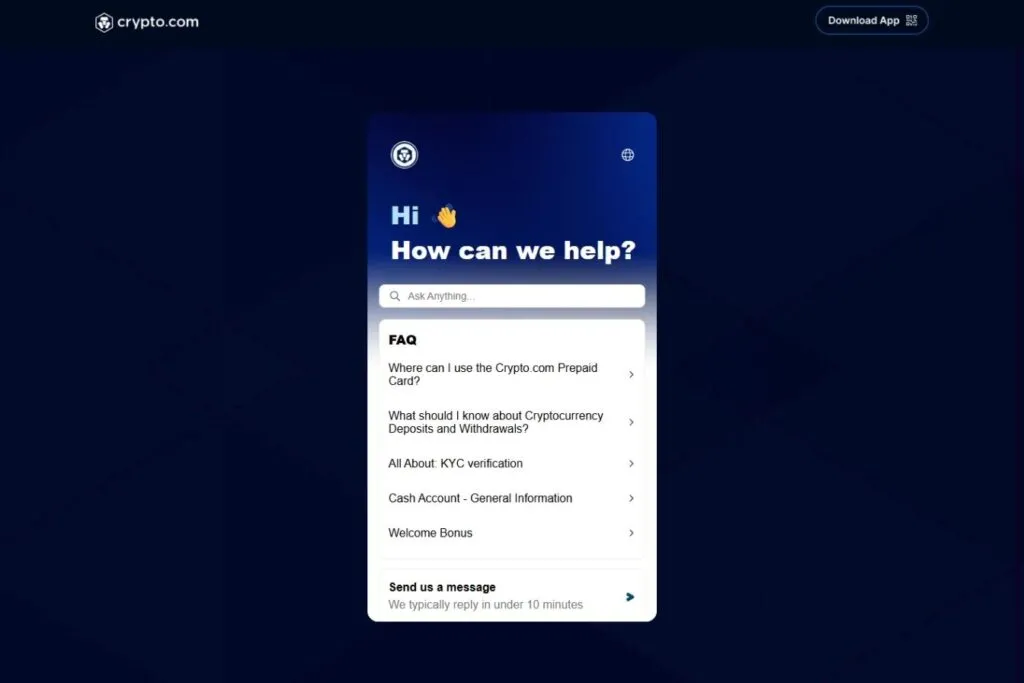
Crypto.com offers in-app live chat, web chat and email, with no phone support that I could find. In my own testing, live chat for basic questions responds within minutes, and the help centre at help.crypto.com covers most common questions well. The breakdown happens at the compliance and account level. A frozen account creates a ticket that goes into a queue separate from front-line chat, and when market volume spikes and thousands of users hit issues together, that queue stretches. That is the gap between the strong app store rating and the weak Trustpilot rating: smooth for most users until someone needs a human fast. The pattern is consistent with my own observations testing the platform over multiple years.
What Protections Do You Actually Have On Crypto.com?
Restricted Dealer status means the CSA and OSC have reviewed the firm and attached conditions to how it serves Canadians, including rules on custody, disclosures and investor questionnaires. It is a real layer of oversight. It is not the same as being a CIRO investment dealer: the CIRO membership list does not show Crypto.com, so I would not assume the kind of investor protection fund coverage that applies to CIRO members. Crypto is not insured by the government the way a bank deposit is. In practice your protection is the firm's own controls, its regulator's conditions and your habits: keep only what you need on the platform, use strong authentication and withdraw what you plan to hold for years to a wallet you control.
How Do You Decide Between Crypto.com And The Alternatives?
Start with what you want it for. If you want to buy Bitcoin or Ether once or twice a year, a simple, clearly priced platform like Coinbase or Wealthsimple Crypto is easier. If you trade often, compare the orderbook fees at Crypto.com with the flat 0.20% at NDAX and Kraken Pro's fee schedule, using a trade size that matches yours. If you want the card, work out what you would actually spend each month and what you would have to lock in CRO to earn rewards on it, then ask whether a plain cashback card does the same job. If you want staking, compare supported coins and provinces. And if you want a very long coin list in a registered account, Crypto.com is one of the few that offers it. Take the exchange quiz if you are still unsure.
Who Should Use Crypto.com Canada, And Who Should Not?
Crypto.com suits Canadians who want a wide coin list in a CSA-registered environment, who will use the orderbook view for trading, and who genuinely want the card ecosystem. It is not for people who want the cheapest, simplest published pricing.
Pros
- You want a broad coin list in a CSA-registered account
- You will use the orderbook view for regular trading
- You want a crypto Visa card and accept the CRO staking model
- You want staking and the wider ecosystem in one account
- You are comfortable checking fees yourself before you trade
Cons
- You will stay on the app without checking the spread: NDAX at a flat 0.20% or Coinbase Advanced are easier to price
- You need quick human support during an account freeze
- You want a Bitcoin-only self-custody experience: try Shakepay or Bull Bitcoin
- You do not want any exposure to the CRO token
How Is Crypto.com Activity Taxed In Canada, And Does It Report To The CRA?
Every trade, swap, card spend with crypto and staking reward can be a taxable event in Canada. Staking and referral rewards are generally income at the value when you receive them, while selling or swapping creates a capital gain or loss that depends on your cost. Crypto.com lets you export your transaction history, which you can import into a tool like CoinLedger or Koinly. Keep your records even if you stop using the platform.
On the CRA question, I did not find an official Crypto.com statement that spells out exactly what it reports. It is a FINTRAC-registered money services business and follows Canadian identity and anti-money-laundering rules, but the duty to report gains is yours either way. The export is the tax document that matters: download your full transaction history each year. See my guides to crypto taxation in Canada and staking and taxes.
Is Crypto.com Worth It For Canadians In 2026?
If you do open an account, here is the short list I would follow. Finish verification and turn on two-factor authentication and whitelisting on day one. Make one small Interac deposit, one small trade and one small withdrawal to see every cost and every delay with your own eyes. Decide up front whether you will use the app or the orderbook, and write down the fee you expect so you can compare it with what you are charged. Keep the long-term part of your holdings in your own wallet. And review your settings every few months, because products, tiers and provincial rules at Crypto.com change faster than most platforms, and the page you read last year may no longer describe what the app offers today.

Crypto.com has grown into one of the more complete crypto platforms available to Canadians, and the CSA decision of May 8, 2025 closed the regulatory gap. The legitimate criticisms have not gone away: the app spread is not shown up front, the CRO dependency ties card perks to a volatile token, and account-level problems are not rare. My recommendation is to use the orderbook view, not the app, once you know what you are doing, make one small trade first to see what you actually pay, and check the current Level Up terms before you stake any CRO. If you mainly want cheap spot trading without the ecosystem complexity, NDAX at a flat 0.20% is simpler. If you want a wide coin list, staking and a card in one regulated account, Crypto.com is a reasonable choice. You can sign up through Crypto.com. Take the exchange quiz to compare options or ask questions in r/OCryptoCanada.
What Changed For Crypto.com In October 2026?
- The CSA list still shows only the May 8, 2025 decision for Foris DAX CAN ULC, with no amended decision.
- FINTRAC shows Foris DAX CAN ULC registered until June 30, 2027.
- Crypto.com's Canadian page promotes instant zero-fee CAD deposits by Interac and Apple or Google Pay, and the Level Up program.
- The CSA issued its Restricted Dealer decision for Foris DAX CAN ULC.
How Does Crypto.com Compare With Other Exchanges?
Where Do These Facts Come From?
Fees, coin counts, registrations and ratings in this review were checked against these official pages and registers:
- crypto.com/ca/licenses
- securities-administrators.ca/crypto-platforms-regulation-and-enforcement-actions/crypto-pl
- securities-administrators.ca/crypto-platforms-regulation-and-enforcement-actions/banned-cr
- ciro.ca/office-investor/dealers-we-regulate
- fintrac-canafe.canada.ca/msb-esm/reg-eng.xlsx
- crypto.com/ca/fees
- crypto.com/exchange/document/fees-limits
- api.crypto.com/exchange/v1/public/get-instruments
- help.crypto.com/en/articles/9575514-welcome-bonus
- apps.apple.com/ca/app/id1262148500
- play.google.com/store/apps/details?id=co.mona.android&hl=en_CA&gl=CA
How I test and score exchanges: my methodology.
Frequently Asked Questions
Is Crypto.com Legal, Safe And Available In Canada?
Yes, it is available. Crypto.com serves Canadians through Foris DAX CAN ULC, a Restricted Dealer registered with the OSC and CSA (decision of May 8, 2025) and a FINTRAC-registered money services business. Turn on strong two-factor authentication, the anti-phishing code and address whitelisting.
It is not on the CSA banned list.What Are Crypto.com's Fees For Canadians?
Its Canadian page says maker and taker fees are as low as 0.08% and 0.18% and deposits are zero-fee, with other fees and spread possible. I could not retrieve one complete Canadian fee table, so make a small trade first and compare the price you got to the market.
The app is the simple buy and sell screen with the spread built into the price. The orderbook shows maker and taker fees and is usually cheaper for regular trading.Can Canadians Deposit CAD By Interac On Crypto.com, And How Do I Withdraw?
Yes. Its Canadian page lists instant, zero-fee deposits by Interac e-Transfer and Apple or Google Pay. Other fees and spread may apply.
I could not retrieve a published list of Canadian CAD withdrawal methods, so check the app. If a CAD route is not offered to you, send the crypto to a Canadian exchange such as NDAX or Kraken, sell it there and withdraw by Interac. Test with a small amount first.
How Many Coins Does Crypto.com Offer In Canada?
Its Canadian page says 400+ supported cryptocurrencies. Availability can differ by province.
Is The Crypto.com Visa Card Available In Canada?
Yes, as a prepaid Visa card. Its Level Up program offers up to 5% in CRO rewards on eligible purchases, and higher tiers require staking CRO.
Does Crypto.com Have Proof Of Reserves?
Yes. It publishes a page describing an independent third-party verification of customer balances using Merkle trees, so users can check that their balance was included.
Can Canadians Trade Futures Or Margin On Crypto.com?
Not that the Canadian page lists. Futures and margin are not shown for Canadian retail, so confirm in your app before you assume they are available.
Does Crypto.com Report To The CRA, And What Tax Documents Do I Get?
I did not find an official Crypto.com statement of exactly what it reports to the CRA. It is a FINTRAC-registered money services business, and you are responsible for reporting your own gains. Export your transaction history from the app each year and import it into a tax tool such as CoinLedger or Koinly. Keep the records even if you stop using the platform.
Why Do People Complain About Crypto.com?
The common complaints are account freezes, slow escalation during busy markets, app spreads that are not obvious and the CRO staking needed for card perks.